





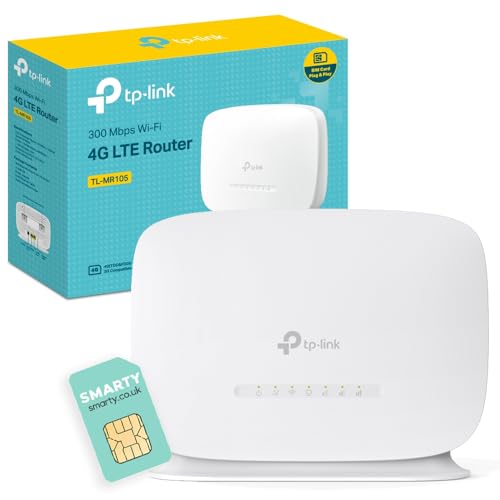
Mobile broadband router that shares a 3G/4G connection across a household while supporting up to 32 wireless devices and offering external antenna ports. For anyone fed up with flaky landlord broadband, TP-Link TL-MR105 WiFi 4G Router keeps phones, laptops and a smart TV online. Will its 4G limits suit households that regularly upload large media files?
⚡ At a Glance
- • Network Speed: 4G Cat4 LTE with up to 150 Mbps download and 50 Mbps upload, plus N300 local Wi‑Fi for everyday browsing and streaming
- • Best for: Households, holiday lets and small home offices needing quick setup and reliable mobile broadband for multiple devices
- • Not ideal for: A content creator uploading large RAW video files; the 50 Mbps upload speed creates a measurable bottleneck that lengthens transfer times and slows cloud backups
Shares a Nano SIM 3G/4G connection over N300 Wi‑Fi and supports external antennas and 32 wireless clients. The free Smarty SIM and TP‑Link Tether app make setup straightforward.
Keep Everyone Online – 4G Cat4 and N300 Wi‑Fi deliver everyday connectivity
The router accepts a Nano SIM and runs on 4G Cat4 LTE with quoted peak speeds of 150 Mbps down and 50 Mbps up, while local wireless uses the N300 standard that supports multiple client connections. Direct Impact: those figures sustain web browsing, video calls and HD streaming for several users without constant dropouts.
Multiple phones, tablets and a single smart TV stream and browse concurrently with minimal buffering, making it suitable for normal home use. Trade-off: heavy multi-camera streams or frequent large uploads will approach the hardware's limits and slow overall throughput.
Simple Setup and Control – Plug, app and manage with the TP‑Link Tether interface
A plug-and-play design pairs with the TP‑Link Tether app on Android and iOS for network management and basic configuration. User Scenario: insert the SIM, power the unit and use the app to change SSID and passwords within minutes.
Quick activation gets a household online without router configuration headaches, which suits hosts and non-technical users. Consideration: advanced routing rules or enterprise-level controls are not part of the simplified management experience.
Stable Backup Options – WAN fallback and external antenna ports improve reliability
Built-in support for a WAN connection backup lets the unit act as a wired router with mobile failover, while external antenna ports accept antenna connections to boost reception in poor-signal locations. If you move between properties or travel with intermittent broadband, the failover capability prevents complete outages during short landline dropouts.
Keeps a home online during a broadband interruption and lets signal-challenged locations gain extra reach with antenna hardware. Trade-off: the solution improves resilience for everyday users, but businesses requiring guaranteed connectivity or SLAs should consider a dedicated commercial failover service.
✨ The Verdict on TP-Link TL-MR105 WiFi 4G Router Performance
- Free Smarty SIM included – Immediate mobile connectivity without hunting for a SIM
- External antenna ports – Measurable reception gains in weak-signal areas
- Supports up to 32 devices – Keeps multiple phones and tablets connected simultaneously
- TP‑Link Tether app – Fast network setup and simple password and guest management
📋 Technical Details at a Glance
- Wireless standard: N300
- Max 4G download: 150 Mbps
- Max 4G upload: 50 Mbps
- LTE category: 4G Cat4
- Maximum wireless clients: Up to 32 devices
❓ Frequently Asked Questions
Q: What SIM comes in the box and how is it activated?
A: A free Smarty data SIM is included and various plans are available through the provider; activation follows the SIM supplier's process. Pro-Tip: insert the Nano SIM before first power-up and test signal strength in different rooms to find the best placement.
Q: How secure is the wireless network?
A: WPA-PSK and WPA2-PSK encryption protect the wireless connections for typical home use. Pro-Tip: set a strong, unique passphrase in the Tether app and change it if the router is used in a shared holiday let.
🏆 Our Verdict
Well-suited to households, holiday rentals and small home offices that need quick, reliable mobile broadband and easy management. The free Smarty SIM, external antenna ports and WAN backup make it a flexible option for locations without stable wired internet. Best treated as a practical, mid-range mobile solution rather than a replacement for business-grade fixed broadband or heavy upload workflows.
